
Virtual Terminal Payments Without a Physical Register

Accept eligible card-not-present payments through a secure browser-based interface for phone orders, invoices, professional services and other remote-payment workflows.
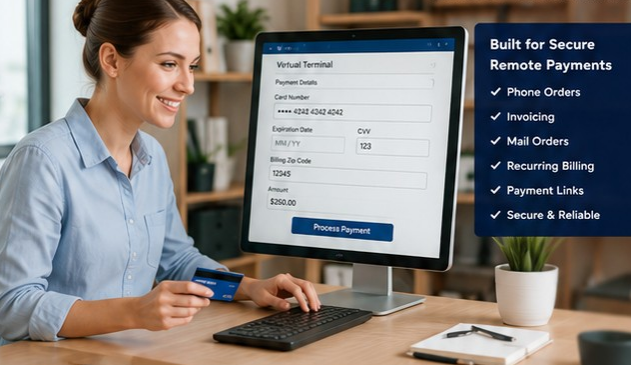
Virtual Terminal Payments for Remote and Office-Based Transactions

A virtual terminal can help eligible businesses accept card-not-present payments from a secure browser-basedinterface. It can be useful for phone orders, invoice payments, professional services and other workflowswhere the customer is not standing at a traditional checkout.

Quick Answer: What is a virtual terminal?
A virtual terminal is a secure web-based tool that allows authorized users to enter eligible payment informationfrom a computer or supported device. It is commonly used for phone orders, invoices, remote services and othercard-not-present transactions.

Where a Virtual Terminal Can Fit

Phone Orders
Enter eligible card-notpresent transactionsfor customers who callto pay.
Invoices
Collect payments fromcustomers afterservices are completedor invoices are issued
B2B Payments
Support office-basedpayment collection forapproved business-tobusiness workflows.
Remote Services
Professional andservice businesses canaccept paymentwithout a physicalcheckout.
Backup Acceptance
Use a browser-basedpayment methodwhen an appropriateterminal or POS isunavailable.

Virtual Terminal Features to Evaluate

Manual Entry
Enter eligible card-not-present transactions through a secure interface.
Invoices
Create or support invoice-related payment workflows where available.
Customer Profiles
Store approved customer records or payment references when supportedand compliant.
Recurring Payments
Schedule recurring or repeat payments where permitted and appropriately authorized.
Reporting
Review transaction activity, users and payment history.
User Permissions
Control which staff members can accesspayment functions and reporting.

Ask AI Max Whether a Virtual Terminal Fits

AI Max — Virtual Terminal Guide
Do you mainly take payments by phone, invoice or online?
Do you need recurring payments or customer profiles?
Would online checkout or a payment link be a better fit?
AI Max can help identify
• Whether a virtual terminal fits
• Card-not-present use cases
• Invoice / payment-link alternatives
• Whether online checkout is a better fit
• The correct secure application path
AI Max can ask general questions about how customers currently pay, whether transactions are mostly phone-basedor invoice-driven, whether the business also needs online checkout or payment links, and whether a virtual terminalis the simplest fit

Already Processing? Compare the CurrentSetup First.

Free Merchant Statement Analysis
Use the dedicated statement-analysis software to review the current processing statement before changingproviders or adding remote-payment tools. AI Max explains the options and next steps, but does not perform thetechnical statement analysis.

A Guided Virtual-Terminal Qualification

 Are most remote payments taken by phone, invoice, payment link or another method?
 What approximate monthly volume and average ticket will be processed remotely?
 Will more than one employee need access? Does the business need recurring payments, invoices or customer profiles?
 Would online checkout or a payment link be better than manual entry?
 Which secure application path and live specialist should receive the lead?

Security and Card-Not-Present Risk

Card-not-present transactions can carry different fraud and chargeback risks than in-person payments. Theselected solution should use appropriate security controls, user permissions, PCI-aware procedures andavailable fraud-prevention tools. Sensitive payment data should never be collected through ordinary websitechat or unsecured forms.
Secure Access
Limit virtual-terminal access to authorized staff and useappropriate user permissions.
PCI-Aware Procedures
Keep payment-handling practices aligned with the selectedsolution and applicable PCI responsibilities.
Fraud Controls
Limit virtual-terminal access to authorizeUse available card-not-present controls and reviewtransaction patterns where supported.d staff and useappropriate user permissions.
Sensitive Data Boundary
Never collect card numbers, banking credentials, SSNs orunderwriting data in ordinary AI chat.

Virtual Terminal vs. Customer-FacingOnline Checkout

Virtual Terminal

Usually an internal payment-entry tool used byauthorized staff for eligible remote transactions.

Virtual Terminal

A customer-facing experience where the customercompletes the payment themselves through a website orhosted page

Frequently Asked Questions

Do I need special hardware for a virtual terminal?
Often no dedicated countertop terminal is required for basic browser-based entry, but hardware and softwarerequirements vary by solution.
Can I use a virtual terminal for phone orders?
Yes, many businesses use virtual terminals for eligible card-not-present phone payments when their processingsetup permits it.
Can I create recurring payments?
Many restaurant-focused platforSome virtual-terminal platforms support recurring or scheduled payments. Customer authorization and providerrules should be reviewed before use.ms support handheld or tableside payment workflows. Compatibility andfeatures vary by system.
Is a virtual terminal the same as an online store?
No. A virtual terminal is usually an internal payment-entry tool for staff, while an online store lets customerscomplete checkout themselves.
Can AI Max tell me whether I need a virtual terminal or online checkout?
AI Max can help narrow the best category based on how your customers pay, then route you to the right page ormerchant specialist.

Accept Remote Payments With the Right Setup

Apply now, upload your statement for analysis, or ask AI Max to guide you.

APPLY NOW | FREE STATEMENT ANALYSIS | ASK AI MAX